

If you are running Ostinato on Windows and you are seeing duplicate packets in Wireshark, this article is for you.
Why are the packets duplicated?
Actually, Ostinato is sending only one packet, not duplicates.
However, Wireshark MAY show duplicate packets. This isn’t Wireshark’s fault either.
This happens when both WinPcap and Npcap are installed on the same machine and both services are running.
When both packet capture libraries are active simultaneously, they can both capture the same packet, causing Wireshark to display duplicates even though only one packet was actually sent.
You can find out if both services are running by executing the following command -
"C:\Program Files (x86)\Ostinato\drone.exe" -v

Ostinato Drone 1.2.0 rev c82cccc5eb4f@

PCAP Lib: WinPcap version 4.1.3 (packet.dll version 4.1.0.2980), based on libpcap version 1.0 branch 1_0_rel0b (20091008)

Service npf status running
Service npcap status running
Note: newer versions of Ostinato Drone are at C:\Program Files\Ostinato\drone.exe. They may also be at a custom location if you chose a non-default installation path.
As can be seen from the output, both WinPcap (service npf) and Npcap are running.
Note that this is not an Ostinato problem and is seen with other tools as well.
If you are seeing duplicate packets in Wireshark and Ostinato is not installed, you can check the service status using the following commands -
sc query npf
sc query npcap
Temporary fix
You can temporarily fix this issue by stopping the WinPcap npf service.
From an elevated command prompt (Run as Administrator), run the following command -
net stop npf
Restart Wireshark and check if the issue is fixed.
Note: This temporary fix may not work in all cases, depending on how your system is configured. Even if it works, the service will be restarted automatically when you reboot the machine.
It’s better to fix the issue permanently.
Permanent fix
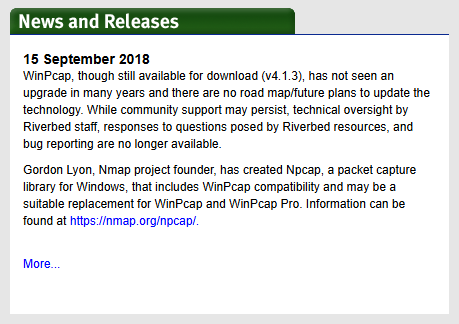
The last release of WinPcap was in 2018. It is no longer developed or maintained. Npcap is the recommended replacement.
From the winpcap.org website:
The permanent fix is to uninstall WinPcap and reboot the machine.
Rerun the drone -v command to verify that the npf service is no longer running (the status may be reported as unknown which means the service is not installed and not running).
If after uninstalling WinPcap, Ostinato does not start because wpcap.dll or packet.dll is not found, please see the following FAQ for steps to fix it.
If despite everything suggested here, the issue is still not fixed, contact support.