
The Path Maximum Transmission Unit (MTU) is the largest packet size that can traverse a network path without fragmentation. If packets are larger than the path MTU, they get fragmented or dropped. This leads to performance issues and connectivity problems. Knowing the path MTU is essential when configuring MPLS tunnels, VPNs, or troubleshooting network connectivity.
To find out the MTU for a network path, you can use a sweep test. Some platform have a ping sweep command e.g. here’s Juniper’s RSVP LSP ping sweep -
ping mpls rsvp <lsp-name> sweep
If you want to do something similar in Ostinato, here’s how -
Using the GUI
- Using the GUI, create a UDP stream towards the destination IP address
- In the IP header, enable the Don’t Fragment (DF) configuration
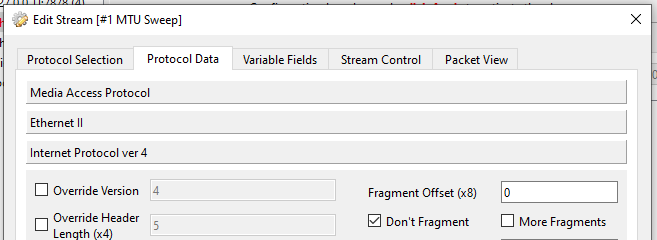
- Verify the stream is working by sending a few packets and ensuring that the packets are received at the destination
- Now, set the frame length mode to Increment with suitable minimum and maximum frame lengths
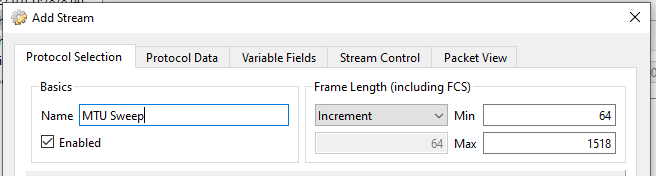
- Make sure you set the number of packets to at least
frameLengthMax - frameLengthMin + 1 - Change the packet rate from the default 1 packet/second to 1000 packets/second so that the transmit is faster and the test completes faster
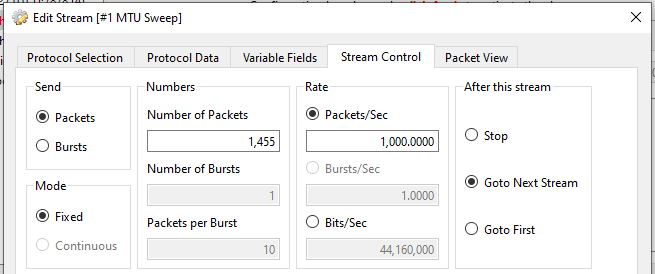
- Send all packets
- On the receiver, capture the packets and note the frame length of the packets that are received
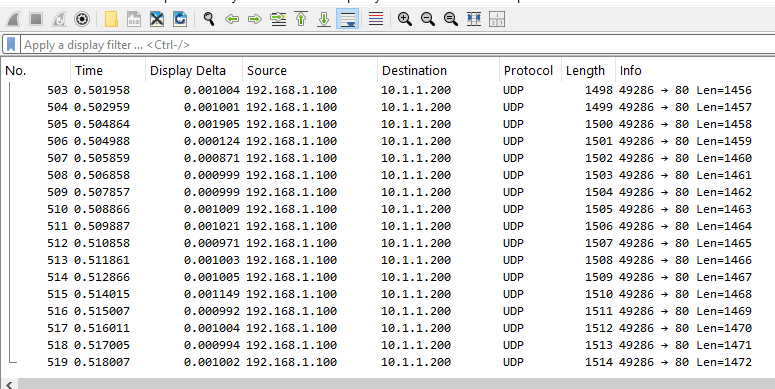
The highest frame length that is received is the MTU for the network path.
Note that the Ostinato stream’s frame length includes FCS while Wireshark’s frame length does not - so make sure to adjust for those 4 bytes!
Some tips -
- If there’s a firewall in between the sender and receiver, set the UDP ports to values that are allowed by the firewall - this is why reachability verification in step 3 is important
- If the highest frame length that is received is same as the maximum frame length (after adjusting for the 4-byte FCS), the MTU may be higher than the maximum frame length - so try increasing the maximum frame length and re-running the test.
- Varying the frame length in the stream will lead to multiple flows being generated - if the number of flows exceeds your license limit, you may need to run the test multiple times with different min/max frame lengths
Using the Python API
Instead of sending packets for all frame lengths from minimum to maximum, you can send a single packet with the minimum and maximum frame lengths and then use a binary search to find the MTU.
This approach avoid generating multiple flows and is therefore more efficient.
You can use the GUI to first verify reachability of the stream (similar to step 3 in the GUI approach above) then use the Python API for the binary search algo with just start/stop transmit/capture commands - see Python API Easy Start for more details on how to do this.