
What is a SYN Flood
A SYN flood is a type of network attack where an attacker sends a large number of TCP SYN packets to a target device in an attempt to overwhelm its resources and cause it to crash or become unresponsive.
A TCP SYN packet is the first packet in a TCP three-way handshake to establish a TCP connection. You can review the TCP three-way handshake in TCP vs UDP: Understanding Differences and Use Cases.
The recipient opens a socket to listen for the incoming connection and sends a SYN-ACK packet back to the sender. If the sender does not respond with an ACK packet, the recipient will wait for a timeout and then close the socket. If in this timeout window, the sender sends a flood of SYN packets corresponding to different connections, the recipient may run out of resources and/or may get overwhelmed and become unresponsive.
The SYN flood may not only affect the recipient device, but also any network devices in the path which may track TCP connections e.g. NAT, stateful firewalls etc.
Please note that although Ostinato is stateless and cannot establish a TCP connection, it can still generate a TCP SYN flood since sending a SYN packet can be done statelessly. It can also verify NAT scale for TCP connections in NAT and stateful firewall scenarios.
⚠️ SYN flood traffic should only be generated in controlled lab environments for legitimate testing purposes.
This includes testing your own devices, network infrastructure, or security defenses.
Generating SYN flood traffic against systems you do not own or have explicit permission to test is illegal and unethical. Always ensure you have proper authorization and are working in an isolated test environment before generating any flood traffic.
How to generate a TCP SYN flood with Ostinato
Ostinato can be used to generate a TCP SYN flood as follows:
- Create a new stream and set protocols as
Mac | Eth | IP | TCP - Set the IP source address to the source port’s IP address or an emulated device IP address
- Set the IP destination address to the target device IP address
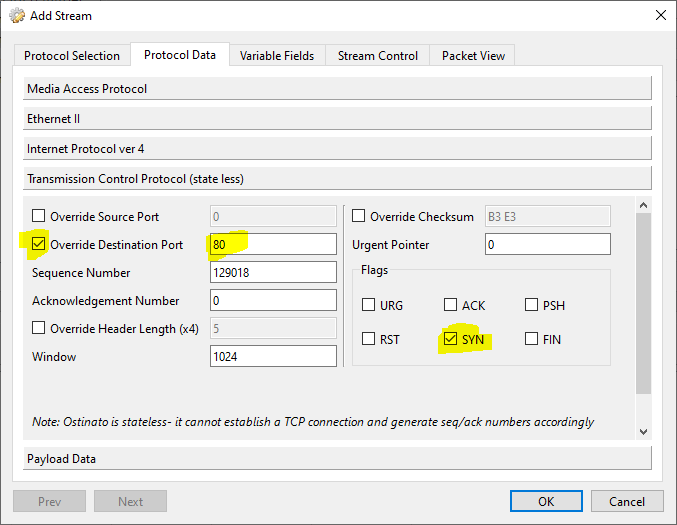
- Set the TCP destination port to a known open TCP port on the target device (e.g. 80 for HTTP)
- Set the TCP flags to
SYN
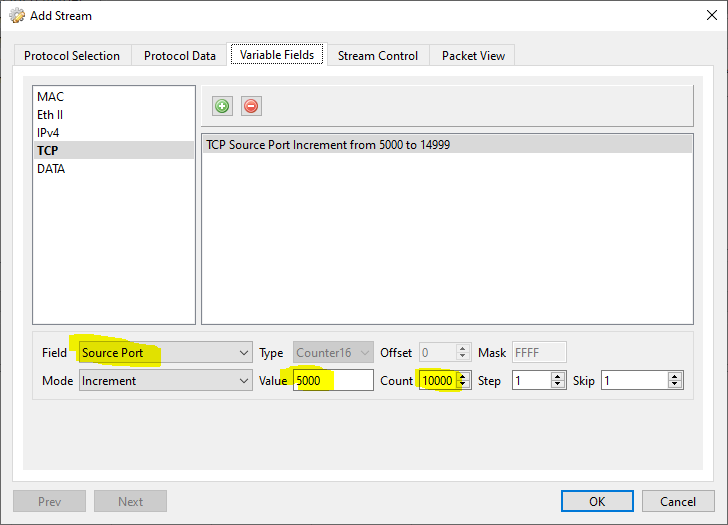
- Go to the Variable Fields tab and create a variable field for the TCP source port (see guidelines below)
- Set the stream packet rate to a high rate (see guidelines below)
- Click Apply followed by Start Transmit
The flood part is done by setting the TCP source variable field count to a high number. The packet rate of the stream should also be set to a high rate for the flood to be effective.
What is “high” is determined by the target device and the network infrastructure in between. Here are a few guidelines -
- L4 port numbers are 2 bytes long, so the maximum value is 65535
- A TCP source port variable range of 10K to 50K is a good starting point
- 1Kpps to 10Kpps is a good starting point for the packet rate
Instead of (or in addition to) varying the TCP source port, you can also vary the source IP address.
Verifying the SYN Flood
Once configured, start transmitting the stream and monitor the target device. You should see:
- High CPU usage on the target device
- Connection table exhaustion (if applicable)
- Potential service degradation or timeouts
- Increased SYN-ACK responses from the target
Monitor the target device’s connection state table and resource utilization to verify the SYN flood is having the intended effect. You can also check Ostinato’s port statistics to confirm packets are being transmitted at the expected rate.
Testing Tips
When testing with SYN floods:
- Start with lower packet rates and gradually increase to find your device’s limits
- Monitor both the target device and any intermediate network devices (firewalls, NAT devices)
- Use multiple source IP addresses to simulate distributed attacks
- Verify your test environment is isolated from production networks
For more information on configuring variable fields in Ostinato, see the Variable Fields section of the stream configuration documentation.