
Many first-time Ostinato users encounter the issue of traffic not reaching their destination. This is a common issue and there are a few reasons why this might happen.
This guide will walk you through the most common reasons why your traffic might not be reaching your destination and how to fix them.
Double-check the IP address in the stream configuration
This one trips up even experienced engineers!
If you use Ostinato emulated devices to simulate a source or destination device, the default IP address used is in 198.18.x.x range. This looks deceptively similar to the 192.168.x.x private IP range which most network engineers are familiar with and use in their testing. They look similar, but they are different in both the octets!
198.18.x.x != 192.168.x.x
Ensure you are using the correct IP address in the stream configuration.
Error and Warning Logs
Make sure to review the error and warning logs in the Ostinato GUI to see if there are any clues as to why your traffic might not be reaching your destination.
If you see any error or warning logs, jump to the relevant section below to troubleshoot the issue.
ERROR: Source MAC Resolve failure
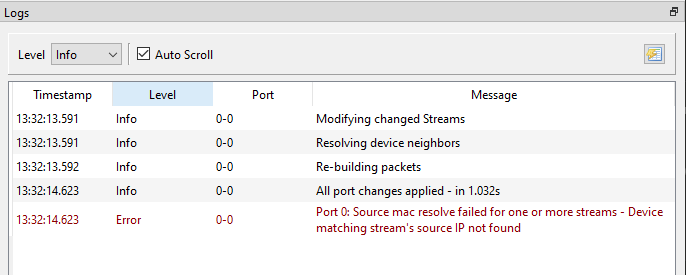
By default, Ostinato streams are set to resolve the source and destination MAC addresses based on the source and destination IP address set in the stream configuration.
Specifically, the source IP (along with any VLAN tags) MUST match either the IP address assigned to the port by the OS or an emulated device IP address. Make sure this is the case. For VLAN-tagged traffic, ensure stream and device VLANs match - see generate VLAN tagged traffic for how VLANs work in Ostinato and review the KB article Source MAC Resolve Failed for troubleshooting steps.
Destination MAC resolve will be attempted only if the source MAC resolve is successful. Ensure you fix your source MAC resolve failure before moving forward.
ERROR: Destination MAC Resolve failure
Only if the source MAC resolve is successful, Ostinato will attempt to resolve the destination MAC address based on the destination IP address (along with any VLAN tags).
Ensure the destination IP address (along with any VLAN tags) matches the IP address (and expected VLAN tags) of the destination device. If you determine these are correct and match the destination device, run a packet capture on the local port to monitor ARP requests and responses.
If you don’t see any ARP requests being sent out by the local port, in the Ostinato GUI devices tab - clear the ARP cache and retry ARP resolution.
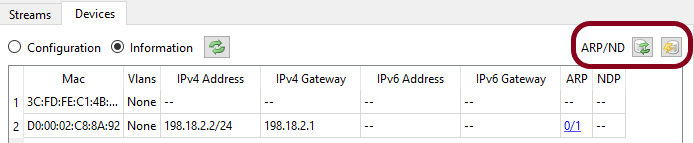
If you see ARP requests in the packet capture, but no ARP response, start a packet capture on the destination device to monitor ARP requests and responses. Verify the following -
- ARP requests are reaching the destination device
- The destination device is responding to the ARP requests with a valid ARP response
- Contents of ARP requests and responses are valid
- VLAN Tags match the expected VLAN tags
Please note that, if the destination (or source) MAC address is not resolved, Ostinato will still send the traffic stream with src/dst MAC set to 0 - which will be dropped by the next hop in the path. Therefore, ensure you fix your source and/or destination MAC resolve failure before moving forward.
Ostinato TX port statistics are not increasing
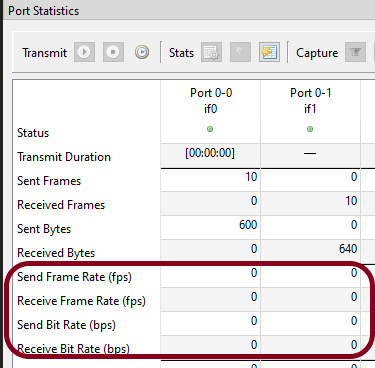
By default, Ostinato transmits 10 packets per stream and then stops. Depending on the packet rate, the TX may have finished and the current send rates may show as zero when you check them.
While troubleshooting, you might want to have a continuous stream of traffic - this can be achieved by setting the stream’s Goto to Goto First (instead of Stop) - so that the stream loops continuously.
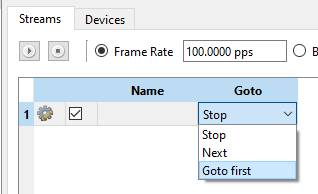
After making and applying the change, check the TX port statistics again - the send rates should now be increasing.
Still not reaching the destination?
If you have followed all the steps above and the traffic is still not reaching the intended destination, you need to put on your network engineering hat and start troubleshooting the issue.
Here are a few things you can try and check -
- Verify using stats that Ostinato generated packets are going out of the local port
- Verify using packet capture on the local port that Ostinato generated packets have the correct source and destination MAC and IP addresses
- Verify each node on the path that the packets are being forwarded. You can use packet capture on the node; if packet capture is not available, send a specific rate of traffic from Ostinato. At each node check the traffic rates on ingress and egress ports to check if the node is forwarding or dropping the traffic.
If you are still not able to reach your destination, you can post on the Ostinato Forum and get help from the community.